

- Get Your Body Measurements


ABOUT 3D MEASURE UP
A PERFECT FIT

Key Features
- Automatically detect and measure 250+ body landmarks


- Measure distances, girths, heights, volumes etc. Make specific measurements that you need

- Accurate and fast. We provide exact geometrical measurements

- Takes 3D scan as input(OBJ/STL/PLY/GLTF/GLB)

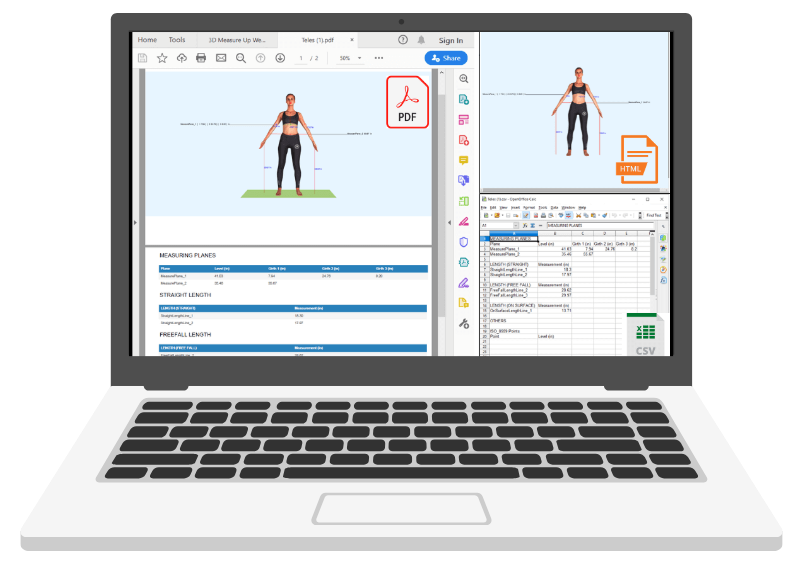
- Export your measurements to CSV, PDF, HTML format

- Web App with state of the art 3D Visualization and UI/UX

- Uses unique combiation of machine learning (ML) and geometric computations for landmark detection

- Privacy and Confidentiality: Your data (3D scans) is always yours and used only for computing measurements

- Works on any device – laptops, tablets, smartphones

- Can be deployed on your own Cloud infrastructure

- OEM version available for custom branding

- PaaS – Integrate with your own app or service. Highly extensible and portable cloud API available

3D BODY MEASURING SOLUTION
ADDITIONAL FEATURES
AUTOMATICALLY DETECTS HUNDREDS OF LANDMARKS
Detects landmarks from the 3D scan of the human body supporting global standards like ISO 8559, BUFAR etc.
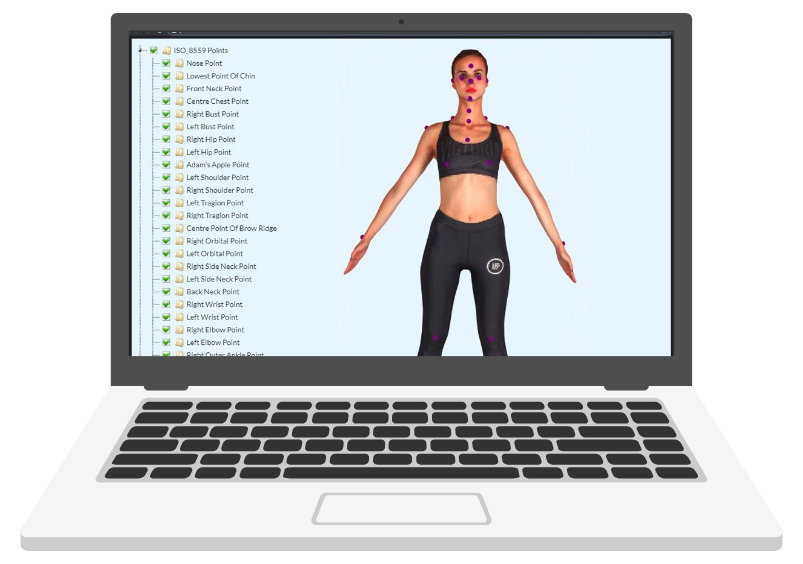
Accurately measure heights, distances (straight, surface, convex etc.), girths, areas, volumes etc.
Supports various measurement tools like tape measure, fall off, vernier caliper etc.
01
Girth measurements
Measures various landmarks with a very high degree of precision

Intelligent handling of units of measurements
Girth plane can be aligned (translate / rotate) and resized (scale)
02
Distance measurements
Measures various landmarks with a very high degree of precision
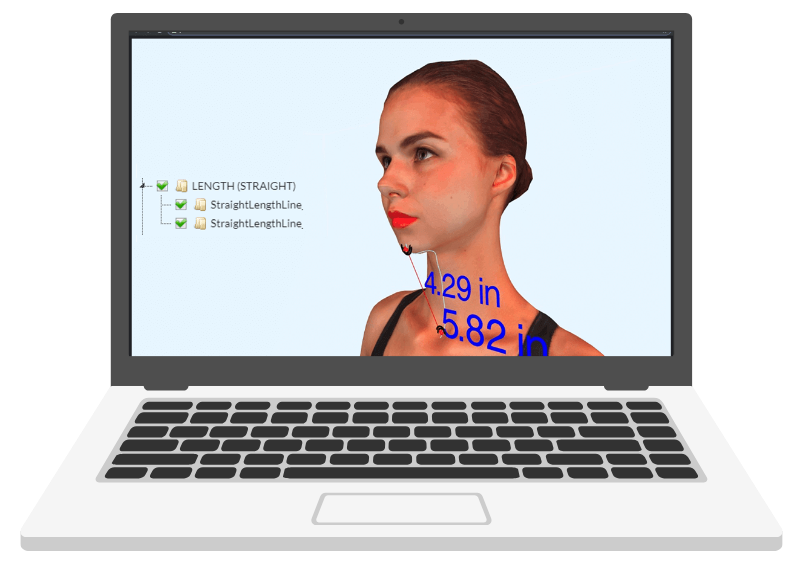
Intelligent handling of units of measurements
Girth plane can be aligned (translate / rotate) and resized (scale)
03
Auto alignment
Automatically aligns the 3D scan

04
Measurements at user specified location
Request measurements at a specific location of your interest

Flexibility in incorporating the measurements in your application the way it suits you
05
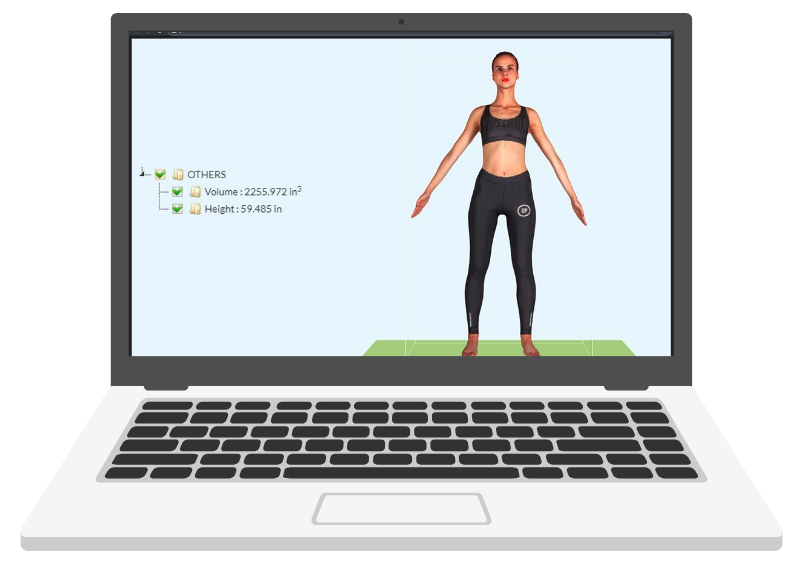
Volume and Area measurements
Volume and Area measurements of the body
06
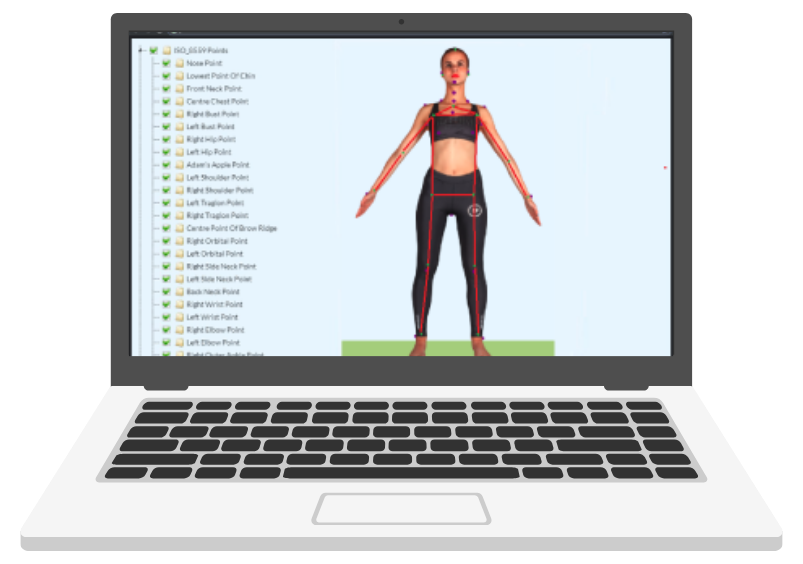
Uses Machine Learning (ML)
Detects the landmarks very accurately and very quickly using a unique combination of ML and Computational model
07
Supported Export Formats
Exports measurements to CSV, PDF and HTML formats
08
WHO WE SERVE
USE CASES
Reduce Garment And Apparel Returns Of Your ECommerce Market Place
The online Ecommerce market place is plague by huge returns (up to 40%) causing tremendous losses. 3D Measure Up provides a great tool to help solve this problem and eliminate the inconvenience caused to customers and help save hundreds of thousands of dollars by preventing such returns.
Body Measurement For Fashion And MTM Garments
With 3D Measure Up, you can identify and measure over 100+ human body features and export them to other software or .csv files. These can then be used to produce made-to-measure garments.
Custom Fitted Compression Socks For Diabetic Patients
3D Measure Up allows you to make specific and accurate measurements at various sections from the ankle all the way up to the thigh area (and even up). Using this data, medical practitioners can order a proper fitting compression socks for their patients.
Monitoring The Effectiveness Of Wellness Programs At Gym Or A Fitness Center
Using 3D Measure Up, a gym or a fitness center can monitor the changes in various body measurements of their customers viz. waist, bust, biceps and help evaluate the progress and effectiveness of workouts or wellness programs. This can increase the customer statisfaction and retention by motivating them through 3D visualization of body transformation.
Hear from our Customers











BENEFITS
Version History
New Features
Introduced Measurement Details Sidebar
The new Measurement Details Sidebar provides a clearer and more efficient way to review and manage measurements:
- View measurement type, name, value, and height at a glance.
- Access step-by-step, in-context tool guidance directly within the workflow.
- Rename measurements directly from the sidebar without switching screens.
- Automatically view newly added custom measurements.
Improvements
- Back Landmark Detection: Improved back-view landmark identification for higher accuracy and consistency across varied body shapes and postures.
- Crotch Point Detection: Enhanced detection accuracy even in scans where the thigh mesh is fused.
- Narrow Waist Detection: Better identification of waist landmarks for rectangular and less-defined torso body types.
- Maximum Biceps Measurement: Increased accuracy of biceps measurements in cases with armpit or upper-arm mesh fusion.
- Knee-Level Girth Measurement (6 cm above Knee Cap): Enhanced accuracy for girth calculations on thigh-level fused mesh scans.
New Features
On-Premise VM (Virtual Machine) Edition
Complete Data Privacy
- All processing — including 3D files, measurement computations, and exports — occurs entirely within your environment.
- No data leaves your secure network.
Full Control of Compute & Storage
- Run the entire 3D Measure Up stack on your own infrastructure.
- Your own CPU/GPU resources.
- Your own storage systems.
- Your own network and access policies
Offline Operation
- After initial activation, the system can operate without continuous internet access, making it ideal for.
- High-security environments.
- Air-gapped networks.
- Enterprises with strict compliance requirements.
Consistent Performance
- Because all computing happens locally, performance is predictable and independent of external network speeds.
Enterprise-Ready Isolation
Each VM instance runs as an isolated environment, making the solution:
- Easy to deploy
- Easy to maintain
- Immune to changes in cloud infrastructure
French & Spanish Support for HTML Export via API
The HTML export feature now supports French and Spanish in addition to English. When calling the API, simply specify the target language in the request body:
iOS App
New Features
- Download OBJ Models: You can now download your scanned 3D models as OBJ files, complete with materials and textures for seamless use in other 3D tools.
- Export Measurements as PDF: Export all measurements or only the selected ones into a clean, well-formatted PDF. Share or save it instantly with a single tap.
UI & Usability Improvements
- Enhanced Layout for Long Measurement Names:
Long measurement names now display more clearly, supported by improved table headers for better readability. - Polished iPad Experience: Better full-screen support, smoother interactions, and important crash fixes to make your iPad workflow more reliable.
- Cleaner Viewer Toolbar: The measurement viewer toolbar has been reorganized to provide a more intuitive and streamlined user experience.
UI & UX Enhancements
- Alignment Confirmation Windows: The confirmation dialogs for Align Model, Manual Alignment, and Clear Scene have been redesigned for smoother navigation and a refreshed visual theme.
- Settings Window Update:
The Settings window now features an improved and more consistent theme. - Onboarding Tour Improvements: The onboarding tour for new users has been updated to provide a clearer, more guided introduction to the app.
iOS App
- iPad Support: The app now runs natively on iPads, providing a smoother and more responsive experience on larger screens.
- Full-Screen 3D Viewer: Enjoy an immersive experience with a larger canvas for your 3D models.
- Enhanced Visualization: Lighting, real-time shadows, and orbit controls have been refined for more realistic 3D rendering.
- Quick Camera Reset: Double-tap anywhere to instantly reframe the camera view.
- Gesture Guide: A new in-app reference explains common navigation and measurement gestures.
- Measurement Overlay: On-model readings are now sharper and easier to interpret.
New Features
- Manual Scanner Unit Configuration: You can now manually set the scanner unit directly in the Settings window — perfect for scans imported from different devices or systems.
- Flexible Unit Options
- Web App: Choose a unitless mode if you prefer to work without specific measurement units.
- API: Configure units independently for both viewing and scanner inputs: viewingUnit –
- m, dm, cm, mm, in
- scannerUnit – m, dm, cm, mm, in, or unitless.
Measurement Improvements
- Enhanced accuracy for following anthropometric measurements on scans of people with slight postural irregularities such as stooping and tilts:
- Chest ATS Girth
- Bust ATS Girth
- Bicep Girth
- Waist Girth
UI & UX Enhancements
- Export Measurements Window: Redesigned for easier navigation with a refreshed visual theme.
- Scanner Unit Settings: Relocated to the main Settings panel for quicker access.
- Language Preferences: You can now change the app language directly from the Settings window.
New iOS Application
– 3D Measure Up
Available on the App Store: 3D Measure Up
Key Features:
- Full-Body 3D Scanning – Capture a detailed 3D model of the human body
- Foot 3D Scanning – Capture a detailed 3D model of the foot using just your iPhone
- Automatic Measurement Extraction – Get accurate girth, breadth, depth, and length measurements instantly
- Search & Filter Measurements – Find specific measurements quickly by name or category
- Sample Models Included – Explore pre-loaded models for quick demos
New Features:
- 3D Measure Up MCP Server
- The 3D Measure Up MCP Server provides a simple and powerful tool that allows AI assistants to retrieve human body measurements from 3D body scan models.
- You can use it to work with any client that supports the Model Context Protocol (MCP), such as Cursor IDE or Claude AI. Once configured, the tool can be invoked by your AI agent to process 3D models and return structured body measurement data in real time.
- 3D Measure Up MCP Server
New Measurements:
- Outer Head Girth
- Added a new measurement that includes hair coverage. This was previously part of the original Head Girth calculation.
- (3DMU ID - Tape: 193)
- (3DMU ID - Contoured: 1193)
- Added a new measurement that includes hair coverage. This was previously part of the original Head Girth calculation.
- Improvements
- Head Girth - Updated to exclude hair, providing a more accurate anatomical head circumference.
New Features
- MeasureMATE – Your Measurements Copilot!
We’re excited to share a big update with you! We’ve added a new Copilot called 'MeasureMate' to the 3D Measure Up website and app, making it easier than ever for you to explore our AI-powered 3D body measurement software and get instant answers anytime, 24/7!- Get sample API integration code in Node.js, Python, or Go
- View measurements and their definitions for a specific wearable or product
- Map measurements to other formats like Seamly2D, MRohr
- Compare measurements (e.g. waist vs abdomen girth)
- Chat in your language – English, Hindi, Spanish, Portuguese, French & Chinese
Improvements
- Refined following girth measurements for overweight and obese body shape models for the overshoot issue
- Hip Girth
- Waist Girth
- High Trouser Waistline Girth
- Outer Head Girth
New Features
- Custom Landmarks on 3D Models
– Users can now add custom landmarks directly on the model. These landmarks can be repositioned for better accuracy and flexibility in measurements or annotations. - Unit-Specific Measurement Retrieval via API
– The API now supports returning measurements in the unit of your choice. Use the "measurementUnit" parameter with values like "cm" (centimeter), "m" (meter), "mm" (millimeter), or "in" (inch) for customized output.
New Measurement
- Outer Shoulder Girth
3DMU Measurement ID: 192
Definitions: Girth around the shoulders at the level midway between the level of the Shoulder Point and the Armpit Back Fold Point.
Improvement
- Improved Thigh Girth
– For scans of people with extreme obesity, we enhanced the measurement accuracy to address the girth overshoot that occurred in fused parts at the thigh level, ensuring more precise thigh girth calculations.
New Features
- Landmark Repositioning – You can now reposition landmark points directly, enabling more precise adjustments.
- Measurement Unit Selection in Exported HTML – Exported HTML files now support measurement display in the unit of your choice. To use this feature, include your preferred unit (e.g., cm, in) in the API request body as follows:
viewing_unit_HTML": "cm" // Options: cm, m, mm, inThe measurements in the HTML output will reflect this selection.
Improvements
- Improved Bicep Girth Detection
– Enhanced accuracy in bicep girth measurements by refining axis calculations across various hand positions. - Better Underbust Girth on Lean Models – Improved underbust girth detection logic for lean body types, ensuring greater measurement reliability.
- Overshoot Correction on Obese Models – Refined detection logic to avoid overestimation of underbust girth in obese body types.
New Measurement Types
- Depths – Get deeper insights with depth-related measurements, perfect for structural analysis and ergonomic studies.
- Breadth – Width-based measurements are now more organized, making it easier to understand horizontal dimensions.
- Levels – These measurements provide the height of landmarks or circumferences from the ground, adding another layer of precision for posture and fit analysis.
Seamless Data Export
- PDF Format – Get clear, well-structured reports at your fingertips.
- CSV (Selected Measurements) – Choose only the data you need for a customized report.
- CSV (All Measurements) – Export all available measurements in one go, ensuring you never miss a detail.
API Enhancement
- View active plan details – Know exactly what features and limitations apply to your plan.
- Track your usage in real time – Keep an eye on how much you're using the system.
- Manage your subscription effortlessly – Stay in control of renewals and upgrades.
New Measurements
- Total Crotch Length Up to Trouser Waistline (Tape) – Measures the full curved length from the front trouser waistline, through the crotch, to the back trouser waistline. This is a game-changer for getting the perfect trouser fit!
- Chest Depth – Provides an accurate front-to-back distance of the chest, offering valuable data for posture analysis and clothing fit.
- Chest Breadth – Captures the horizontal width of the chest, essential for designing better-fitting upper-body garments.
Enhancement
- Improved Underbust Girth Accuracy – We’ve eliminated overshoot issues that occasionally occurred in body scans with fused parts at the underbust level. This means better accuracy in sizing and fitting assessments.
- Enhanced Across Back Width Measurement – Different shoulder and torso shapes (square, sloping, V-shaped, pear-shaped, etc.) are now better accommodated, making this measurement more reliable than ever.
Enhancement
- Wrist Point Detection: Enhanced the accuracy of wrist point detection, ensuring reliable results across various arm and hand positions.
- Across Front and Back Width Measurements: Improved measurements to better account for the curvature in the armscye, increasing precision for both across-front and across-back width dimensions.
- Shoulder Width Measurements: Refined the measurement paths for back shoulder width and front shoulder width to accommodate a wider range of posture scenarios, ensuring consistent accuracy.
- Upper Arm and Outer Arm Surface Length: Optimized surface length measurements for the left/right upper arm and left/right outer arm, delivering improved measurement path for different arm and hand positions.
Fixes
- Mobile Device Support: Resolved an issue with the rotation functionality of models in exported HTML files, enabling seamless rotation on mobile devices.
New Measurements
Added 18 new measurements for more personalized application in uniforms and apparel for extremely obese bodies.
- Front Shoulder Width
- Bust point width
- Across back width
- Across front width
- Back Neck to Right Knee (Straight)
- Back Neck to Left Knee (Straight)
- Right Lower knee girth
- Left Lower knee girth
- Left Outleg from Trouser Waist to Floor
- Right Outleg from Trouser Waist to Floor
- Left Outleg from High Trouser Waist to Floor
- Right Outleg from High Trouser Waist to Floor
- Underbust Level to Waist Level
- Left Side Neck Point to Underbust Level
- Right Side Neck Point to Underbust Level
- Left Underbust Level to Gluteal Level
- Right Underbust Level to Gluteal Level
- Underbust Level Front to Underbust Level Back
New Features
- Added Reset Preferences Functionality for default view.
Enhancement
- Improved the Front Neck Point detection on short necks or in cases where the Adam’s apple is not visible.
- For the custom girth measurement tool changed the default measurement type to ‘Measuring Tape'
Enhancements
- Improved the Neck Girth Measurement for body scans with shorter necks.
- Enhanced the Thigh Girth Measurement for body scans where the Gluteal points are positioned higher than the crotch points.
- Improved the High Trouser Waistline measurement for overweight female body scans.
- Updated the Measure API to extract measurements based on the specific measurement IDs provided in the request, to improve the speed.
Fixes
- Resolved the issue where the waist-to-hip surface length measurement did not extend fully to the hip level on certain scans.
New
- Added button functionality to align (Translate, Rotate, Scale) the girth when clicking directly on it.
Enhancements
- Refined trouser waistline girth measurements for overweight and obese body shape models with belly overhang.
- Refined high trouser waistline girth measurements for overweight and obese body shape models to improve accuracy.
- Enhanced lower body landmarks detection on scans with slight tilts.
Fixes
- Fixed the issue where the sign-out button was appearing even when the user was not logged in.
- Fixed the issue where mobile view was not displaying correctly for users who were not logged in.
Enhancements
- Simplified girth selection and alignment by allowing the users to directly select it. Will help users do this faster.
- Updated custom surface length API to return point collection and length of the surface length.
- Added option to delete the models from 3DMU Studio
- Photo to Size API now supports multimodal (based on multiple measurements) size fit recommendations.
- Improved Crotch Point detection on lower body scan with legs spread wide apart.
Fixes
- Updated the measure API response for 3DMU STUDIO Enabled request to return requestId instead of measurements directly.
New
- Added new leg measurements:
- Right & Left Head of Fibula
- Right & Left Base of Gastrocnemius
Enhancements
- Demo models can be now loaded easily in 3D Measure Up Studio.
- 3D Measure Up can now support scans of much larger sizes.
- Improved UI for mobile device users.
Fixes
- Fixed the missing head end girth.
- Fixed the Outleg surface length measurement.
New Product Launch: Photo-to-Size Beta
- Get your size recommendation for your clothes from a single photo. Try this out for free (no Credit Card required) - https://photo-to-size.3dmeasureup.ai/
New Features
- 3DMU Studio: Save models and measurements for future reuse.
- Save Measurement Preferences: You can now save your selected measurements as the default view for all future model loads.
- Load demo models without login in 3DMU Web app.
Enhancements
- Improved Bicep Measurement Retrieval: Now capable of extracting bicep girth, even when the mesh under the arm is flawed.
Fixes
- Measurement Accuracy Improvements: Outleg measurements have been refined to better handle leg tilts and minor bends.
New Features
- Get Unlimited measurements and use all features on demo models for trial plans.
- Added quarterly subscription plan.
Enhancements
- Updated the Error messages and Mesh quality warning.
- Updated the back neck point to wrist surface length according to ISO definition.
- Updated the login page for a smooth login experience.
Fixes
- Added feature to block the registrations from disposable email Ids.
New Features
- Added feature to adjust Bust Girth by repositioning the side bust point landmarks.
Enhancements
- Added support for content header gzip to improve retrieval of source scan.
- Updated the Hip points and Hip Girth.
- Improved the following measurements:
- Back Neck Point To Left Hip Level Front Length Right
- Back Neck Point To Left Hip Level Front Length Left
- Back Neck Point To Hip Contoured
- Back Neck Point To Hip
- Back Neck Point To Knee
- Back Neck Point To Ground
- Hip Contoured
- Export measurement Button now available on the home screen of web app
Fixes
- Fixed the issue of missing bust girth if the auto align is false.
Enhancements
- Improved BackNeck Point to Wrist surface length.
- Improved the Head Girth as per ISO Definition for head not in Frankfurt plane.
Fixes
- Fixed the Narrow waist girth for overweight and obese body types.
- Fixed the overshoot Chest Girth for overweight and obese body types.
- Fixed height annotation updation issue after girth alignment operation.
- Fixed the login issue of the web application on IOS devices.
New Features
- Multiple Language Support (English(default), Spanish, French).
Enhancements
- Improved the Bust Girth extraction for overweight and obese body types.
New Features
- Export measurements in Seamly 2D compatible format.
Enhancements
- Neck measurements improved to support Neck orientation and sizes.
- Navel Girth and Belly point improvements to support different belly sizes.
- Improved the following measurements by account for the body tilt and postures:
- Abdomen Girth
- Hip Girth
- Maximum Hip Girth
- Back Neck Point to Hip
- Chest ATS Girth
- Upper Chest Girth
- Bust ATS Girth
- Under Bust Girth
- Under Bust ATS Girth
- Belly Girth
- Belly ATS Girth
- Waist Girth
- Waist ATS Girth
- Natural Waist Girth
- High Hip Girth
- High Waist Girth
- Waist Circumference Girth
- Crotch Girth
- Left Mid Thigh Girth
- Right Mid Thigh Girth
- Left Biceps Girth
- Right Biceps Girth
- Left Upper Thigh Girth
- Right Upper Thigh Girth
- Left Biceps Maximum Girth
- Right Biceps Maximum Girth
- Crotch Point
- Right Side Pant Inseam
- Left Side Pant Inseam
- Right Side Pant Inseam Upto Ankle
- Left Side Pant Inseam Upto Ankle
- Right Side Pant Inseam Upto Knee
- Left Side Pant Inseam Upto Knee
- Trouser waistline Girth
- High Trouser waistline Girth
New Features
- Added new landmarks and measurements for the foot.
- Added interface to display token usage.
- Added interface to show the status of subscriptions.
- Added feedback button to 3DMU App.
- Notification to the user when the tokens are consumed.
- Improved onboarding experience.
Enhancements
- Improved accuracy of the following landmark on models scanned from a variety of scanners
- Left Tragion point
- Right Tragion point
- Shoulder point
- Armpit point
- Back Armpit fold
- Belly point
- Outer Ankle Point
- Foot length
- Foot width
- Left Upper arm length
- Left biceps
- Maximum Biceps on fused meshes
- Left Biceps Contoured
- Right Biceps Contoured
- Left Forearm Contoured
- Bust girth
- Foot waist girth
- Updated camera from Perspective to Orthographic Camera in the web application to improve accuracy while defining custom measurements
New
Web Application
- Added interface to display token usage.
- Added interface to show the status of subscriptions and usage of tokens.
Web API
- Added new Landmarks Left & Right Front/Back Axilla.
- Added new Girth - Low neck.
- Added new Landmark Low neck point
- Added new Girths - RIght and Left Elbow
- Added new Girth - High Trouser waist to support apparels for women.
- Added new surface length - Tibia length
- Added new surface length - Left and Right Outleg measurement from High Trouser Waist.
- Launched new 3D Measure Up Sydney Region.
- Detect defects in models are report accurate error
Enhancements
DevOps
- Verified accuracy and validity of measurements extracted from 3D Measure Up using Analytical Geometry models like Cube, Sphere and Cylinder.
- Enabled support for multiple Regions to address data privacy and residency concerns.
Fixes
Web Application
- The Girth Profile button was not enabled after the measurements were loaded in the scene.
- The Girth Profile Button toggled on checking and unchecking of measuring plane nodes from model tree.
- Hide Measurement button was not enabled on repositioning of landmarks and then calling auto measurements.
Web API
- Fixed browser cache issue for some models while auto saving measurements.
- Fixed incorrect Bust point landmark detection on some models.
New
Web Application
- The token usage widget is now available to the web app users.
Web API
- Added support for scans in GLB/GLTF file format.
- Added support for scans in PLY file format.
Enhancements
Web API
- Added measurement units for volume and height in the response.
DevOps
- Increased reliability by enhancing internal automated testing.
Fixes
Web Application
- The Girth Profile button was not enabled after the measurements were loaded in the scene.
- The Girth Profile Button toggled on checking and unchecking of measuring plane nodes from model tree.
- Hide Measurement button was not enabled on repositioning of landmarks and then calling auto measurements.
Web API
- Wrist points were not detected at the valid location on models generated from parametric base models.
- Wrist girth on Right hand was detected lower than the wrist girth on the left hand on models generated from parametric base models.
- Contoured Neck base was not connecting front, back and side neck landmarks.
- Trouser Waistline Girth Measurement was missing for some models.
- Accuracy of Bust Girth has been improved on scans with fused arms and torso.
- Improved validity of Upper Chest Girth.
- On scans with pot bellies the waist measurements traversed inside the body.
- Corrected documentation error in the definition of shoulder girth.
- Returning detailed error messages in case of defective models.
- Improved validity of the trouser waist girth.
Enhancements
Web API
- Added more than 1500 models from 7 different scanners to the 3D Measure Up regression tests.
Fixes
Web API
- Improved Bust measurements in case of scans with hands fused along the torso.
- Updated error messages for cases where the scan quality is not good.
- Improved wrist point and wrist girth detection on scan where the wrist is not clearly visible.
New
Web Application
- Added hide measurement feature button to hide measurements in a single click.
Enhancements
Web API
- Improvement to trouser waist girths to support pot bellied bodies.
Enhancements
Web API
- Tape measurement to tight fit on customization align operation.
New
Web API
- Left/Right Gluteal Landmark Points
Enhancements
Web application
- Repositioning of landmarks and updating of related measurements made simpler.
Web API
- Left/Right Side Neck Landmark support for non symmetrical bodies eg. bodies of people with scoliosis or other posture defects.
- Improved accuracy and validity of Left/Right Maximum Bicep measurements.
- Improved accuracy and validity of Left/Right Maximum Forearm measurements
Enhancements
Web API
- Improved repeatability of biceps, reduced variations across different scans of the same persons, within acceptable tolerance.
- Improved repeatability of Shoulder width, reduced variations across different scans of the same persons, within acceptable tolerance.
- Improved repeatability of Outer Arm width, reduced variations across different scans of the same persons, within acceptable tolerance.
- Improved custom measurements request to support multiple measurements in a single request. Current version supports offsets from the waist girth and freefall lengths from waist girth.
Fixes
- Custom Straight length measurements persisted, even after clear scene operation removed other measurements.
New Features
Web Application
- Load Model menu sample number of full body and leg scans in web application.
Web API
- Derive custom measurements from primary measurements.
- Released alpha version of In-premise / offline 3D Measure Up service.
Enhancements
Web API
- Improved performance of extracting custom measurements.
- Improved request structure to define custom measurements based on primary measurements.
Fixes
Web API
- Torso measurements missing for some scans of obese bodies.
New Features
- MOCK API for Photo to Scan
- API Key can be retrieved from the Web Application Settings box
Enhancements
Web API
- Improve Scan to Measure Api documentation
- Improved accuracy of shoulder point detection for Obese bodies
- Improved accuracy of
- Right / Left Shoulder Outer Point
- Shoulder Landmark Centroid
- Right / Left Upper Arm Point
- Front Neck Point
- Right / Left Armpit Front Fold Point
- Right / Left Armpit Back Fold Point
- Chin Point
- Right / Left Biceps
- Right / Left Biceps Maximum Girth
- Right / Left Belly
- Improved repeatability of shoulder point detection across scans of the same person
- Improved repeatability of underbust detection across scans of the same person
DevOps
- Container based infra for ML based landmark detection services for improved repeatability and availability
New Features
New Lengths
- Right Side Pant Inseam Upto Knee
- Straight length from the crotch point to the right knee level along the inside of the right leg
- Left Side Pant Inseam Upto Knee
- Straight length from the crotch point to the left knee level along the inside of the left leg
- Left Sleeve Length
- Length along surface measured from the left side neck point to left wrist along the path passing through the left shoulder and outer side of the left elbow
- Right Sleeve Length
- Length along surface measured from the right side neck point to right wrist along the path passing through the right shoulder and outer side of the right elbow
- Back Neck Point To Hip (Type - Measuring tape)(358)
- Length along surface on the back side of the avatar from the back neck point to the point on plane at the Hip level
- Back Neck Point To Hip Contoured (Type - Tight Fit) (1358)
- Contoured length along surface on the back side of the avatar from the back neck point to the point on the plane at the Hip level
- Back Neck Point To Underbust (Type - Measuring tape) (359)
- Length along surface on the back side of the avatar from the back neck point to the point on plane at the Underbust level
- Back Neck Point To Underbust Contoured (Type - Tight Fit) (1359)
- Contoured length along surface on the back side of the avatar from the back neck point to the point on the plane at the Underbust level
- Back Neck Point To Left Knee Level Front Length (360)
- Tight fit length from back neck point to waist level passing through the left side neck point and free fall from waist to Knee level of left leg from the front side of the body .
- Back Neck Point To Right Knee Level Front Length (361)
- Tight fit length from back neck point to waist level passing through the right side neck point and free fall from waist to Knee level of the right leg from the front side of the body
- Back Neck Point To Left Hip Level Front Length (362)
- Tight fit length from back neck point to left bust point passing through the left side neck point and free fall from left bust point to left hip point from the front side of the body
- Back Neck Point To Right Hip Level Front Length (363)
- Tight fit length from back neck point to right bust point passing through the right side neck point and free fall from right bust point to right hip point from the front side of the body
- Back Neck Point To Left Chest Level Front Length (364)
- Tight fit length from back neck point to the left side chest level point passing through the left side neck point
- Back Neck Point To Right Chest Level Front Length (365)
- Tight fit length from back neck point to the right side chest level point passing through the right side neck point
DevOps
- New Simplified Pricing Model
Enhancements
DevOps
- Updated the 3D Measure Up CI/CD pipeline. 90% of the CI/CD pipeline is now automated.
Fixes
Web API
- For "Backneck to wrist" not passing via the shoulder
Enhancements:
Web Application
- Support for recomputation of auto-generated default measurements with user-specified/modified landmarks
- Support for Hip Girth and other Measurements for partial body models below Hip.
Fixes:
Web Application
- Improve UX of load model operation.
Web API
- The measure API failed for some models
Enhancements:
Web Application
- Load operation now automatically aligns the model and retrieves measurements.
Web API
- Simplified measure API has only one compulsory parameter, object file url. The other parameters are optional. Optional parameters such as file type are detected automatically from the file name.
Improved accuracy
Landmarks
- Left Tragion Point (ID: 212)
- Right Tragion Point (ID: 213)
- Right Outer Knee Point (ID: 243)
- Left Outer Knee Point (ID: 244)
- Left Hip Point (ID: 208)
- Right Hip Point (ID: 207)
- Crotch Point (ID: 236)
- Right Wrist Point (ID: 220)
- Left Wrist Point (ID: 221)
- Center Point Of Brow Ridge (ID:214)
- Right Orbital Point (ID:215)
- Left Orbital Point (ID:216)
Girths
- Hip (ID : 167)
- Butt (ID : 109)
- Maximum Hip (ID : 166)
- Right Thigh (ID : 142)
- Left Thigh (ID : 141)
- Right Upper Thigh (ID : 154)
- Left Upper Thigh (ID : 153)
- Right Mid Thigh (ID : 112)
- Left Mid Thigh (ID : 111)
Surface Lengths
- Right Side Pant Inseam (ID : 335)
- Left Side Pant Inseam (ID : 336)
- Right Side Pant Inseam Upto Ankle (ID : 343)
- Left Side Pant Inseam Upto Ankle (ID : 344)
- Left Lower Arm Length (ID:323)
- Right Lower Arm Length (ID:324)
- Left Outer Arm Length (ID:325)
- Right Outer Arm Length (ID:326)
- Back Neck Point to left Wrist Length (ID:347)
- Back Neck Point to right Wrist Length (ID: 348)
Enhancements:
Web API
- We have made our core algorithms 2x faster now (a result of a water cooler conversation - call it a benefit of working from the office!). You can get the measurements in almost half of the time you used to get it!
Improved accuracy
- Right Orbital Point [ID: 215]
- Left Orbital Point [ID: 216]
Fixes:
Web API
- Fixed multiple girth identification in the torso region in scans with hands close to the body
- Fixed girths erroneously penetrating the mesh of some scans
Enhancements:
Web Application
- Added support for exporting HTML file
Fixes:
Web Application
- Fixed reference points not getting inserted for some models in Girth Profiling.
- Fixed leader lines getting truncated on the split operation of Girth profiling operation.
- Fixed Girth profile buttons remaining enabled even with no reference point inserted
Features: Improved speed and accuracy of auto-alignment of partial body scans eg. scan of a single foot or scan of both legs New Landmarks
- Right Waist to Knee (ID: 349)
- Left Waist to Knee (ID: 350)
- Right Diagonal Trunk Length (ID: 351)
- Left Diagonal Trunk Length (ID: 352)
- Centre Trunk Length (ID: 353)
Enhancements:
Improved accuracy
- Left Side Neck Point To Waist Level (ID: 315)
- Right Side Neck Point To Waist Level (ID: 316)
- Back Neck Point To Waist Level Left (ID: 319)
- Back Neck Point To Waist Level Right (ID: 320)
Fixes:
Web Application
- Fixed gizmo control not orienting in sync with mouse control movement
- Fixed setting views in gizmo to handle the zoom fit also
- Fixed Girth Profile UI interfering with Gizmo control
- Fixed setting pop-up overlaps with gizmo view
- Fixed “All measurements saved” pop-up comes even after no measurements are saved.
Web API
- Fixed retry logic for fetching ML response
Features: Web Application
- Added new gizmo controls to easily change the view.
Enhancements:
Improved accuracy
- Left Shoulder Outer Point (ID:239)
- Right Shoulder Outer Point (ID:240)
- Left Upper Arm Point (ID:241)
- Right Upper Arm Point (ID:242)
- Head Girth(ID:169)
- Head Girth Contoured (ID:1169)
Fixes:
Web Application
- Fixed issue of gizmo control not orienting in sync with mouse control movement
- Fixed issue of setting views in gizmo now handles the zoom fit also
- Fixed issue of Girth Profile UI interfering with Gizmo control
- Fixed issue of setting pop-up overlaps with gizmo view
- Fixed issue of “All measurements saved” pop-up comes even after no measurements are saved.
Web Application
- Fixed issue of gizmo control not orienting in sync with mouse control movement
- Fixed issue of setting views in gizmo now handles the zoom fit also
- Fixed issue of Girth Profile UI interfering with Gizmo control
- Fixed issue of setting pop-up overlaps with gizmo view
- Fixed issue of “All measurements saved” pop-up comes even after no measurements are saved.
Web API
- Fixed retry logic for fetching ML response
Features:
Web API
Introducing API versioning:
3D Measure UP Web API integration has become easier with the introduction of API versioning for the 3D Measure Up API. API versioning enables developers to run production loads on an earlier version while they continue to integrate the latest releases. For more information write to 3dmeasureup@prototechsolutions.com.
Enhancements:
Improved accuracy
Web API The point arrays returned in the API response are now in the model coordinates of the original scan. This will simplify the client applications that render the measurements on the avatar. Developers need not worry about applying any transformation to their original model or the points returned in the API response. 3D HTML Export (alpha): The Web API option to export the measurements along with the 3D view of the avatar now supports surface lengths and landmarks. Web Application: Option to toggle whether to show girth lines always on top of the model or not. Improved accuracy:
- Belly Button (ID: 237)
- Abdomen Point (ID:238)
- Waist Circumference (ID: 163)
- Navel Gith (ID:168)
- High Hip (ID:156)
- Maximum Hip (ID:166)
- Hip (ID:167)
- Total Crotch Length (ID:307)
Fixes:
Web API
Fixed deviation in measurements due to stray girths in scans with fused arm and torso. FIxed deviation in measurement when only measurements for metric ids are requested.
Features:
A new utility application for 3D Measure Up users and developers. This application makes it easy to browse, search and filter the definitions of human body measurements supported by 3D Measure Up with illustrations.
Web API
3D HTML Export (alpha):
The Web API now has an option to export the measurements along with the 3D view of the avatar. This 3D HTML can be viewed in any browser or embedded in any web page and does not require internet connection.
Enhancements:
Improved accuracy
- Belly Button (ID: 237)
- Abdomen Point (ID:238)
- Waist Circumference (ID: 163)
- Navel Gith (ID:168)
- High Hip (ID:156)
- Maximum Hip (ID:166)
- Hip (ID:167)
- Total Crotch Length (ID:307)
DevOps
Implemented a multi-layered regression test system early in the development process to detect unintended changes in measurements.
Fixes:
Web API
Fixed issue of extra measurements returned in Measure API response in addition to the ones requested using the "ids" parameter.
| Features: New Landmarks
|
Features:
- Added support for points array for the measurements of partial body scans.
Enhancements:
- Improved measurements rendering performance.
Fixes:
- Fixed issue of auto-measurements not rendered sometimes due to inappropriate status code handling.
- Improved measure API calling continuous polling approach to avoid long waits.
Fixes:
- UI fixes
- Replaced ProtoTech logo with 3D Measure Up logo.
- Improved icon of Measurement Controls button.
- Within the Girth profile feature, enabled the ending of current task on clicking the corresponding button second time for all operations.
- Resolved unexpected Reference Point creating in the scene within Girth Profile operations.
- Fixed the issue of Reference Point repositioning out of girth in profile operation.
- Fixed issue with Search text remains in search box when user loads the new model or clears scene.
- Fixed timing of the User Profile initialization.
- Fixed the issue in model name division for model name with multiple dots and extension in caps.
Features:
- Introduced new girth measurements that are “Aligned to the skeleton”.
Enhancements:
- Landmark points updated:
- Improved positioning of the chin point on obese body scans.
- Girths updated:
- Renamed "Chest End" girth to "Underbust."
- Surface Lengths updated:
- Redefined "Total Crotch" length as a tape measurement.
- Added "Total Crotch Countered" length.
- Webhook:
- Enabled webhook to report errors during measurement extraction.
- UI improvements:
- Modified the button icon for the Clear Scene operation.
- Modified the warning message for updating the subscription plan to enable functionality.
- Made the warning message clickable (Redirects to "3dmeasureup.com/pricing").
- Added functionality to delete measurement using the context menu on measurement selection.
- Usage tips for each operation are minimized and accessible during the operation.
Fixes:
- UI fixes:
- Fixed the issue with Height annotation being visible when exiting a task using the Esc key.
- Fixed the delay observed in the show/hide measurement functionality using the context menu on measurement selection.
- Fixed the issue in model upload for models with names containing multiple dots.
- Fixed the issue in model name division for model names with multiple dots and extensions in uppercase.
Features:
- Tape measurements for all girths.
Enhancements:
- Landmark points updated:
- Improved accurate positioning of the bust point.
- Girths updated:
- Renamed "Chest End" girth to "Underbust."
- Surface Lengths updated:
- Redefined "Total Crotch" length as a tape measurement.
- Added "Total Crotch Countered" length.
- Webhook:
- Enabled webhook to report errors during measurement extraction.
- UI improvements:
- Repositioned Search box and export button in the Model tree.
- Renamed "Landmarks" node in the Model tree to "POINTS."
- All contoured girths are hidden by default to reduce clutter.
- Escape key exits the current operation.
Fixes:
- UI fixes:
- Reloading the model tree caused performance issues.
- Measurements:
- "Hip or Butt" girth was not identified correctly for some models.
Features:
- Auto-detection of natural waists on all body types including obese or plus-size bodies
Enhancements:
- Landmark points updated :
- Centre Point of Right Knee Cap detection improved for scans with merged knees
- Centre Point of Left Knee Cap detection improved for scans with merged knees
- Girths Updated :
- Left Knee girth measurements improved for scans with merged knees
- Right Knee girth measurements improved for scans with merged knees
- Left Biceps girth measurements improved for plus size bodies
- Right Biceps girth measurements improved for plus size bodies
- Surface Lengths updated :
- Right Side Mid Belly Hip To Ankle (ID: 341) added to support apparel use cases
- Left Side Mid Belly Hip To Ankle (ID: 142) added to support apparel use cases
- Right Side Pant Inseam Upto Ankle (ID: 343) added to support apparel use cases
- Left Side Pant Inseam Upto Ankle (ID: 344) added to support apparel use cases
Fixes:
- Improved support for Quad mesh scans
Features:
- Add custom measurements using 3D Measure Up’s OEM widget.
Enhancements:
- Improved accuracy and support for landmarks related to partial body scans :
- Single Foot
- Single Leg
- Both Legs
- Lower Body only
- Type of the model (i.e Full body/Single Leg/Single Foot/..) is returned along with measure response in a parameter called 'bodyType'
- Information for height from the ground is shown along with the cursor for operations requiring selection on the body surface.
- Height annotation is visible along with Girth annotations for generic girths returned by 3DMU
- Automatic setting of units for foot models
- Settings button to handle settings like enable/disable height annotation
Fixes:
- Improved performance of Model Tree during show/hide operation
- Simplified mouse operation with selection
- Newly inserted girth is Auto selected
- Simplified Pan operation using mouse buttons, to avoid conflict with context menu
- Show tooltips for disabled buttons
- Enabled toggling of divisions during Girth Profiling
Features:
|
Features:
- Added support for webhooks to connect with workflow engines like Zapier, Automate.io
Enhancements:
- Improved UI select a girth and hide other metrics
- The web application shows the name of the model file and its type.
- Enabled faster and accurate Auto Alignment whole body with stray meshes
- Enabled faster and accurate Auto Alignment for partial scans body of the lower body
- Improved accuracy for detecting following landmarks and measurements in A, T and relaxed standing pose and stooping posture
- Neck girth
- Shoulder landmark
- Shoulder width
- Chest girth
- Chest end
- Bust girth
- Bust contoured girth
- Crotch landmark
- Total Crotch length
- Thigh, mid-thigh
- Pant Inseam
Fixes:
- Girth selection did not work on some models
Features:
- Modular OEM Architecture for quick development of branded application
- Launched 3D Measure Up new website (www.3DMeasureUp.com)
Enhancements:
- Simplified API with integrated auto-alignment
- Added support for relaxed standing pose (arms and legs closer to the body)
- Improved customer management for a smoother engagement experience
- Improved accuracy for detecting following landmarks in any pose
- Shoulder
- Low Neck Point
- Front Center Chest
- Left and Right Bust points
- Belly
- Crotch
- Front Left and Right Armpit Points
Fixes:
- Improved accuracy of surface length measurement
Features:
- New 'Starter' plan launched which is free*!
- With following new metrics 3D Measure Up now automatically detects 116 metrics
- Front Chest Width
- Back Chest Width
- Right Side Neck Point To Belly Button
- Left Side Neck Point To Belly Button
- Right Side Mid Belly Hip To Ground
- Left Side Mid Belly Hip To Ground
- Right Side Pant Inseam
- Left Side Pant Inseam
Enhancements :
- Improved customer management for a smoother engagement experience
Fixes :
- Added length as part for SurfaceMeasurements response
Features:
- Added button for 'Girth Profile' feature in the right panel containing measurement related controls.
- Added Vernier Caliper feature.
- Added vertical / horizontal / landmark snapping on CTRL / ALT / SHIFT key press.
- Added feature for auto-saving of measurements.
- Added single web api endpoint
Fixes :
- Fixed measurements getting flipped on the wrong side (Right/Left) for some models.
- Fixed web application getting hung for some models
Features:
|
Features:
- Added feature to get specific measurements in 'Insert Auto-detected Measurements' by providing an array of IDs.
- Added feature to get the profile of a girth.
- New Measurements added :
- landmarks: [ID: 228, 229, 230, 231] - surface lengths: [ID: 307] Fixes:
- Alignment of girths now returns same type of girth (ie Tight-Fit / Measuring Tape)
- Annotations of girths are now conflict free
Features:
- Added support for partial body Measurements.
- Increased Model size limit upto 50 MB.
- Improved Chest girth accuracy.
- Improved 'Insert Girth With Two Selection Points' operation by providing horizontal / vertical snapping for planes.
- Added feature to save model reference on cloud.
YOUR ULTIMATE GUIDE TO METRICS LIST

APPAREL MANUFACTURERS, RETAILERS
Let's Measure
Take our FREE trial today and learn how our AI-powered body measurement technology can boost your business revenue.