How to Integrate 3D Measure Up Webhooks with Google Sheets in Minutes
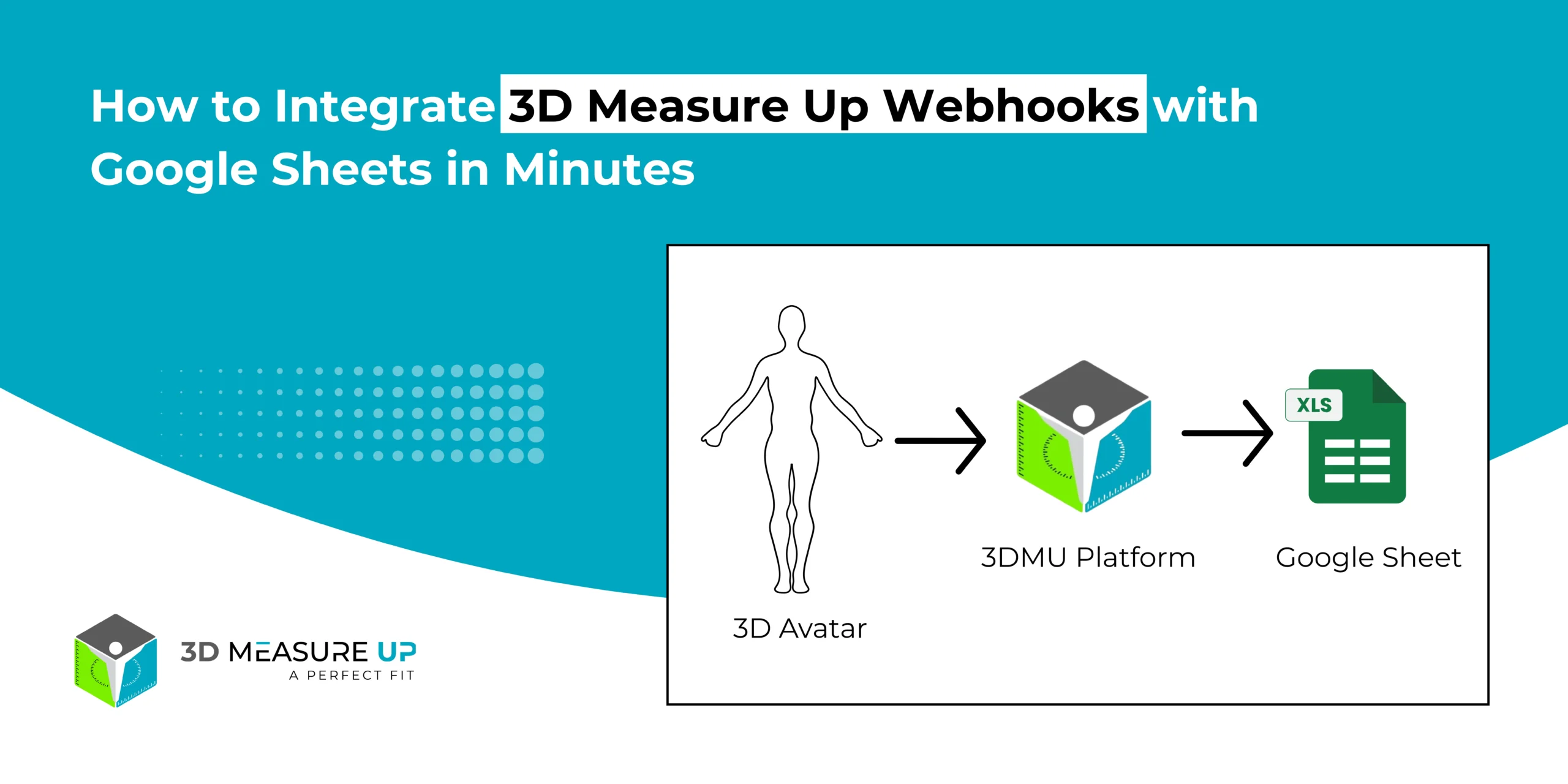
Automatically Send 3D Measurement Data to Google Sheets
- Store, analyze, and share 3D measurement data effortlessly using Google Sheets.
- Automatically push measurement results from the 3D Measure Up platform to Google Sheets with 3D Measure Up Webhooks, eliminating the need for manual exports or backend server development.
This guide explains:
- How the Google Sheets webhook integration works
- How to design the sheet structure correctly
- How to deploy the webhook endpoint
- Best practices for reliable and scalable data storage
What This Integration Does
Once the integration is active, every measurement generated in 3D Measure Up is sent automatically to Google Sheets.
Here’s what happens behind the scenes:
- A measurement is created in the 3D Measure Up platform
- A webhook event is triggered
- Measurement data is sent to a Google Apps Script endpoint
- A new row is appended to your Google Sheet
How the Webhook Flow Works
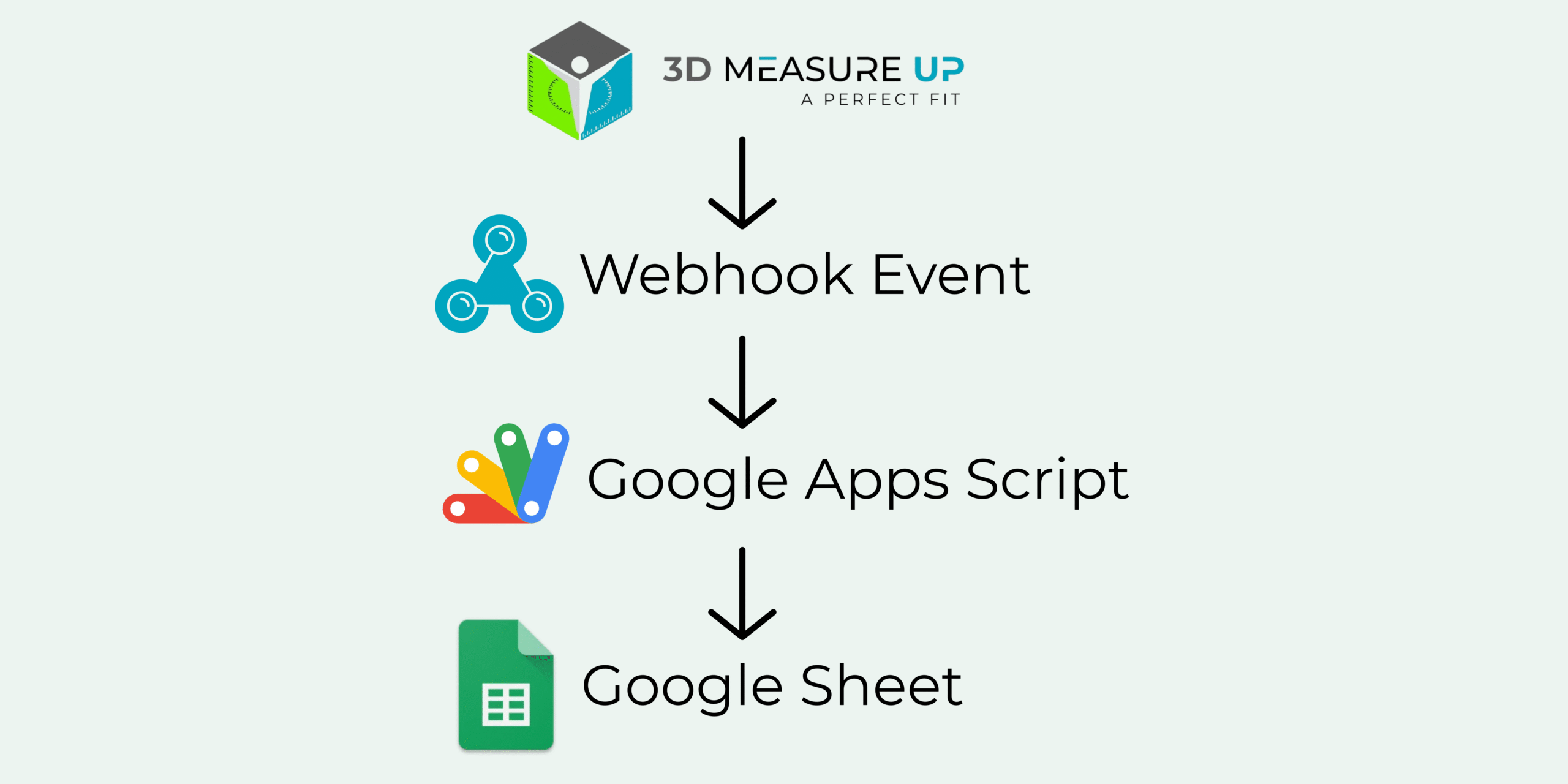
3D Measure Up Platform
↓ (Webhook Event)
Google Apps Script (Web App)
↓
Google Sheet (Rows appended automatically)
This lightweight architecture makes the integration fast, scalable, and easy to maintain.
Recommended Google Sheet Structure (Important)
To keep your data clean and scalable, 3D Measure Up recommends a normalized structure.
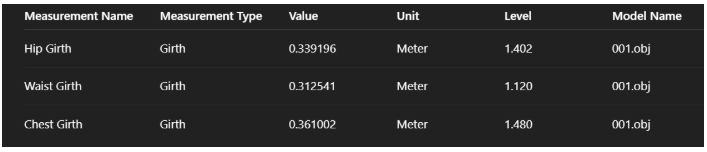
One Row = One Measurement
Instead of creating multiple columns per scan, each measurement is stored as its own row.
Header Row (Row 1)
Create these columns once:
Measurement Name | Measurement Type | Value | Unit | Level | Model Name
Example Rows
Why This Structure Works Best
- Scales effortlessly as the measurement volume grows
- Works perfectly with filters, pivot tables, and charts
- Easy to export to BI and reporting tools
- Prevents column overflow and clutter
- Follows industry-standard “tidy data” practices
Step 1: Create the Google Sheet
- Open Google Sheets
- Create a new spreadsheet
- Name it something like 3D Measure Up Measurements
- Add the header row listed above
This sheet will act as your live measurement database.
Step 2: Create the Webhook Endpoint Using Google Apps Script
In the Google Sheet, go to:
Extensions → Apps Script
- Remove any existing code
- Paste the following script:
function doPost(e) {
  try {
    if (!e.postData || !e.postData.contents) {
      throw new Error("Missing request body");
    }
    const payload = JSON.parse(e.postData.contents);


    // Extract result
    const result = payload?.body?.result;
    if (!result) {
      throw new Error("Missing body.result in payload");
    }
    const metrics = result.metrics || {};
    const unit = result.measurementUnit || "Meter";


    // Extract model name
    const rawModel =
      payload.file ||
      payload.modelName ||
      "Unknown_Model";
    const modelName = extractModelName(rawModel);
    const today = getTodayDate();
    // ✅ Final sheet name: model + date
    const sheetName = `${modelName}_${today}`;


    const ss = SpreadsheetApp.getActiveSpreadsheet();
    let sheet = ss.getSheetByName(sheetName);
    // Create sheet if missing
    if (!sheet) {
      sheet = ss.insertSheet(sheetName);
      sheet.appendRow([
        "Model Name",
        "Measurement Name",
        "Measurement Type",
        "Measurement Value",
        "Level",
        "Unit"
      ]);
    }
    // Helper to append rows
    function appendRows(items, type, valueKey) {
      if (!Array.isArray(items)) return;
      items.forEach(item => {
        sheet.appendRow([
          modelName,                         // Model Name
          item.label || "",                  // Measurement Name
          type,                              // Measurement Type
          item[valueKey]?.[0] ?? item[valueKey] ?? "",
          item.level ?? "",                  // Level
          unit                               // Unit
        ]);
      });
    }
    // Write metrics
    appendRows(metrics.girths, "Girth", "girth");
    appendRows(metrics.breadth, "Breadth", "length");
    appendRows(metrics.surfaceLengths, "Surface Length", "length");
    appendRows(metrics.depths, "Depth", "length");


    return ContentService
      .createTextOutput("OK")
      .setMimeType(ContentService.MimeType.TEXT);
  } catch (err) {
    return ContentService
      .createTextOutput("Error: " + err.message)
      .setMimeType(ContentService.MimeType.TEXT);
  }
}
function getTodayDate() {
  const d = new Date();
  return Utilities.formatDate(
    d,
    Session.getScriptTimeZone(),
    "yyyy-MM-dd"
  );
}
function extractModelName(input) {
  if (!input || typeof input !== "string") {
    return "Unknown_Model";
  }
  // Remove query params
  let clean = input.split("?")[0];


  // Extract filename
  clean = clean.substring(clean.lastIndexOf("/") + 1);
  // Allow only known extensions
  const match = clean.match(/^(.+?\.(obj|stl|glb|ply))$/i);
  return match ? match[1] : "Unknown_Model";
}
Step 3: Deploy the Script as a Web App
- Click Deploy → New deployment
- Select:
Type: Web App
Execute as: Me
Who has access: Anyone - Click Deploy
- Copy the generated Web App URL
Example: https://script.google.com/macros/s/AKfycbxXXXX/exec
Step 4: Configure the Webhook in 3D Measure Up
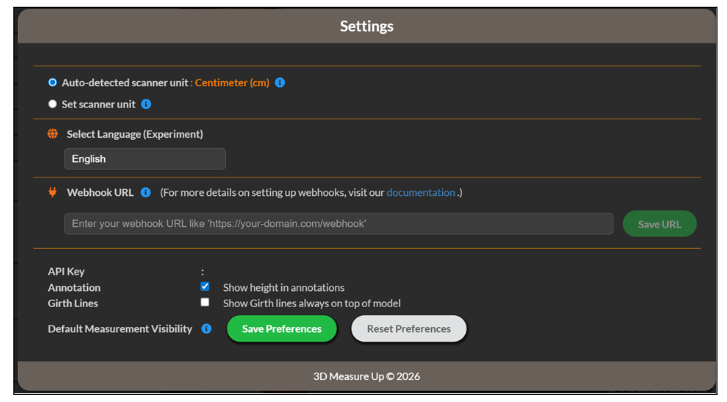
- Log in to the 3D Measure Up Web App
- Go to Settings → Webhooks
- Paste the Google Apps Script Web App URL
- Save the configuration (Once saved, your webhook becomes active immediately; whenever measurements are generated, your URL will be notified automatically)
What Happens After Setup
- Each scan triggers a webhook event
- Measurement data is pushed instantly
- One row is added per measurement
- Data is ready for filtering, dashboards, and sharing
No additional configuration is required.
Best Practices for Reliable Data Management
- Create the header row only once
- Use Google Sheets as a reporting layer, not raw storage
- Group-related measurements using response or model identifiers
- Use model names to trace measurements back to source files
- Build dashboards and pivot tables on top of the data
Security Notes
- Never use the Google Sheet URL as a webhook endpoint
- Always use the Apps Script Web App URL
- Treat the webhook URL like a secret
- Redeploy the script to rotate URLs if needed
Summary
By integrating 3D Measure Up Webhooks with Google Sheets, you unlock a fully automated measurement pipeline:
- Measurements flow instantly
- No backend development required
- Data remains clean, scalable, and analyzable
- Ideal for reporting, QA, analytics, and collaboration
Webhooks deliver the data. Google Sheets makes it usable.
If you have any questions, please contact us at 3dmeasureup@prototechsolutions.com